.png)
Guide to Starting
UCLA PICU
Specific Onboarding Help for Los Robles EM Residents OR any residents' first time to UCLA PICU
**Additional Rotation Information:
-
Team Structure, Daily Schedule, Contact Information
-
"PICU Days" - Info to help start your first PICU Shift: pre-rounding, rounds, updates, daily notes, etc
QUICK REFERENCE - Pediatric Code Cards
Know Before You Go! - AMION Schedule

Will need to setup an Amion/Doximity account

Once Signed into AMION – you should be able View schedule

AMION Finder Page – which UCLA Peds residents are on-call

Individual Schedules – Select “My Schedule” Icon

Select your name from the LR EM-PICU dropdown list & select “Create Schedule”

EXAMPLE SCHEDULE:

Reading your Schedule:
You are expected to be in the PICU every day of the rotation except for the days labeled as "UPIC Days Off"
Morning Signout starts at 5:30a
Evening Signout starts 5:30p-5:45p by resident
Know Before You Go! - Badge & Parking
UCLA Health Badge


You will need your badge for your first day –
BADGE ACCESS
-
RFID in your badge will give you access to the parking structure and certain locked doors on campus (eg. call room suite, ER entry, etc)
-
Know where your “UCLA ID Number” and “Prox Card #” are on your badge – these are the numbers that security will need to fix any access issues you have with your badge
RR UCLA Parking Lot 8
555 Westwood Plaza, Los Angeles, CA 90095


Pictured above heading North on Westwood Blvd
Turn Left up the ramp to the 4th Floor (roof) for daily parking
Parking Lot to Hospital


Go to the bottom floor, and there should be an exit back to Westwood Blvd
Turn Right (back toward the ramp you drove up) and walk towards the white marble building (RR Hospital)

RR UCLA Hospital Entrance - under the V shaped awning
Getting Around RR UCLA
Lobby:

Once inside, this is the lobby
- Main East Elevators are past the information desk, turn right where the security guard is
- Walk past the information desk and security guard and the Cafeteria will be on your left

Take the East Elevators to the 5th Floor

Off on the 5th floor
Turn Left in the Elevator lobby (towards the aquarium mural)


Turn Left when you see the first double door (this is the patient/family entrance to the PICU)
Walk down the hallway until you see the Puffin Photo and another set of double doors on your Left (transport elevators)


Now turn to your RIGHT - this is the physician entrance to the PICU
- Badge scanner for entry on your Right
Once inside, you'll be at the "Alcove" where all the PICU residents gather, pre-round, work
UCLA HEALTH IT ONBOARDING
https://it.uclahealth.org/resources/resources-for-clinicians
Step 1: Enroll in DUO
-
Multi-Factor Authentication – required for SPOK paging app onboarding, remote EMR access, etc
Step 4: Install Citrix and Access CareConnect Remote
-
Steps to required for remote EMR access
Step 5 & 6 & 8: Ensure Computer Encryption & Install Trellix Endpoint Security & Install OnGuard for Onsite Access
-
Steps required for laptop access to hospital secure wifi (UCLAHealthSecure)
Step 9: Mobile Device Encryption with Intelligent Hub
-
Required to use phone for SPOK paging app & EPIC Haiku Mobile app
Additional Resources – Mobile Applications
-
EPIC Haiku Mobile app setup instruction
CareConnect (EPIC) Remote Access:

CareConnect
(EPIC EMR) Info-
Pt Lists
Login – use your “mednet” username and password
Choose Department: MD PED CRITICAL CARE or MD PED HOSPITALIST

Create your List(s):

Creating SM Pediatrics List:
-
Name list: “SM Pediatrics”
-
Select “Copy” at bottom right

One (of many) Column Template options: “SMW PEDS [38205]”


Adding Team List to new “RR PICU” My List:
Find Available Lists (bottom Left)
-
Select “RR/NPH” -> Primary Team RR -> Pediatrics - Critical Care


Right Click – Send to – RR PICU

This should create your list of all RR PICU Patients -

CareConnect
(EPIC EMR) Info-
SmartPhrases & Handoffs
Note Templates
History & Physical: .PEDSRESHP
D/C summary: .PEDSRESDC
Progress note: .PEDSRESPN
Transfer summary: .PEDSRESTRANSFER
Transfer accept: .PEDSRESTRANSFERACCEPT
These should be shared with you in CARECONNECT – however, we can only do so if/when you have CARECONNECT access. So if you do not have these “dotphrases”, you can copy them from any current UCLA Peds resident:
Epic button -> Tools -> SmartTool Editors -> My SmartPhrases

At the top: “User” – search for a current UCLA Peds Resident you are working with
Scroll down and highlight all smartphrases that start with: “pedsres[ ]”
Then at the top select “Add to My SmartPhrases”

Patient Handoff


Communication:
Paging
SecureChat
Using SPOK paging
Paging system smartphone app – tied to your 5 digit pager number
Guides & Instructions:
https://it.uclahealth.org/support/guides/guide-for-spok-mobile-paging-application
CareConnect (EPIC) SecureChat
Used by Nursing, Staff, & Physician for Non-Urgent clinical communication
On CareConnect Desktop:

EPIC Haiku App – Mobile App:

Webpaging –

Can search by name, pager ID
On Call List - Search by Service, who is “on call” for the service:

Usually look for SMH Pediatric [blank]
Pager Coverage
Signout pager to be covered by another pager/resident
Most commonly used after signout to night team intern
Start with “Personal Profile” -> Profile

-
Pager ID: [your 5 digit pager ID number]
-
Password: [initial password is “12345”]
Select Coverage -> +New
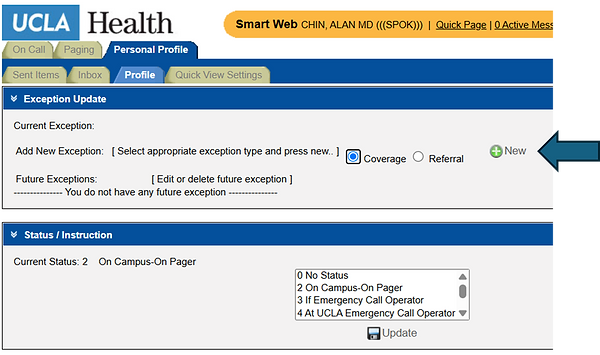
Put in pager number of covering intern (usually night intern) – or search by name
Set Start Time & End Time of the coverage
Press “Save”


